What is an exhibit cover page?
An exhibit cover page names the document before anyone reads it: matter, parties, platform, date range, page count, and exhibit label. Here is the full checklist.
Written by the ThreadProof team · Last updated · About the team
Changelog: Added the field checklist and the labelling conventions section.
Quick answer
An exhibit cover page is the first page of an exhibit. It states the exhibit label, the matter, the parties, what the document contains, the platform and device it came from, the date range covered, and the total page count, so a reader knows what they are holding before seeing any content.
A cover page answers the questions a reader would otherwise have to work out for themselves: what is this, whose is it, what period does it cover, and how many pages should there be.
It costs one page and changes how the rest of the document is read. Without it, page one is a cropped screenshot with no context.
Steps
- Label the exhibit. Put the label at the top: Exhibit A, Exhibit 1, or whatever convention the recipient uses. If nobody has told you, sequential letters are a safe default.
- Name the matter and parties. State the matter name or reference and the parties involved, spelled the same way they appear elsewhere in the file.
- Describe the contents. One line: text message conversation between the parties, captured from an iPhone, covering 4 January to 22 March 2026.
- State the page count. Give the total page count including the cover, and repeat the total in every page footer as Page X of Y.
- Note redactions and capture date. Say whether the exhibit contains redactions and when the screenshots were captured, then point to the redaction log page.
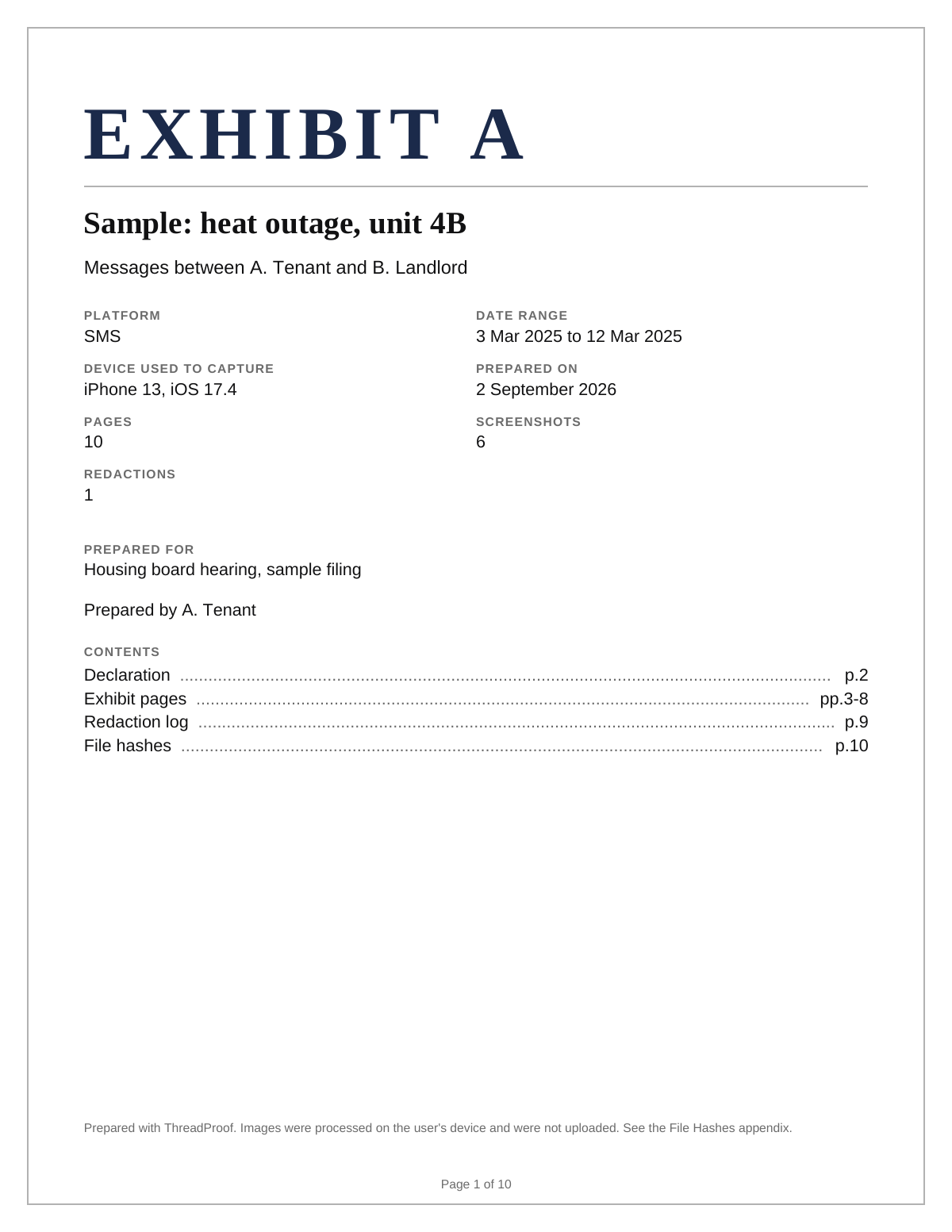
The full field checklist
A good cover page fits on one page with room to breathe. Crowding it with explanation defeats its purpose, so keep each field to a single line and put any narrative on a separate page.
- Exhibit label.
- Matter name or reference.
- Parties.
- Description of contents.
- Platform and device.
- Date range covered.
- Capture date.
- Total page count.
- Whether redactions are present.
Labelling conventions
Different forums use letters, numbers, or party-prefixed labels. Ask, or follow what the other documents in the matter already use. Whatever you choose, keep it identical on the cover page, in the footer, and in the file name.
What to include
- Exhibit label, matter, and parties.
- A one-line description of the contents.
- Platform, device, and capture date.
- The date range covered.
- The total page count.
Common mistakes
- Writing a narrative on the cover page instead of a description.
- Omitting the page total.
- Using a different exhibit label in the footer than on the cover.
- Leaving the date range vague, such as 'various dates'.
- Forgetting to say the exhibit contains redactions.
What the PDF should contain
- Cover page with all checklist fields.
- Message pages in chronological order.
- Page numbers with a total on every page.
- Redaction log.
- Hash appendix.
Build this exhibit on your phone
Add your screenshots, redact what should not be in the record, and export a numbered PDF. Nothing is uploaded.
Frequently asked questions
- What should be on an exhibit cover page?
- The exhibit label, the matter and parties, a one-line description of the contents, the platform and device, the date range, the capture date, the total page count, and a note if redactions are present.
- Does the cover page count as a page?
- Yes. Include it in the total and number it, so the page count in the footer matches the number of sheets in hand.
- Should I use Exhibit A or Exhibit 1?
- Follow whatever the recipient or the rest of the file uses. If nothing has been specified, sequential letters are a common default.
- Can I put an explanation on the cover page?
- Keep the cover page to short factual fields. If explanation is needed, put it on a separate page so the cover stays scannable.
- Does the file name matter?
- Yes. Match the exhibit label and matter in the file name so the document is identifiable in an email attachment list.
Summary
- A cover page states what the document is before any content is seen.
- Keep every field to one line and include the total page count.
- Match the exhibit label across the cover, the footer, and the file name.
Related guides
Cite this guide
ThreadProof team. “What is an exhibit cover page?.” ThreadProof, updated 2026-09-01. /guides/what-is-an-exhibit-cover-page
ThreadProof helps you format and organise documents. Nothing here is legal advice, and ThreadProof makes no representation about how any document will be treated by any court, agency, or other body. Rules differ by place and by matter. Questions: abe.mainlinesites@gmail.com.