Text message evidence PDF: what belongs in the file
What a text message evidence PDF should contain: a cover page, ordered screenshots, continuous page numbers, a redaction log, and a hash appendix. Built on your phone.
Written by the ThreadProof team · Last updated · About the team
Changelog: Expanded the hash appendix section and added the page-structure checklist.
Quick answer
A text message evidence PDF should open with a cover page naming the matter, parties, and date range, then present the screenshots in chronological order on numbered pages with a page total, followed by a redaction log and a hash appendix listing a fingerprint for every source image.
A text message evidence PDF is a single document that holds your screenshots in order, states what they are, and lets a reader confirm nothing is missing. The value is not in the software that made it; it is in the structure. Five specific parts do the work: a cover page, ordered pages, continuous numbering, a redaction log, and a hash appendix.
Structure also protects you from the two questions everyone asks about screenshots: is this the whole conversation, and has anything been changed. A numbered document with a page total answers the first. A hash appendix gives a way to answer the second later.
Steps
- Write the cover page first. Name the matter, the parties, the platform, the date range covered, and the total number of pages. Writing this first forces you to decide the scope of the exhibit before you start arranging images.
- Order the screenshots chronologically. Arrange the images oldest to newest. Do not group by topic and do not move a message next to a related one from a different day. Chronology is the only order a reader can verify.
- Number every page with a total. Use a footer such as Page 7 of 31 on every page including the cover. A total makes an incomplete copy obvious at a glance.
- Record each redaction. Every solid box you draw gets a line in the redaction log with the page number and the reason, such as unrelated third party or account number. Recording the redaction is what separates it from tampering.
- Append the hashes. A SHA-256 hash is a fingerprint of a file. List one for every source screenshot at the end of the PDF. Anyone who has the original image can recompute the hash and see that it matches.
- Export and keep the sources. Export the PDF and store the original screenshots alongside it in the same folder. The PDF is the presentation; the screenshots are the source.
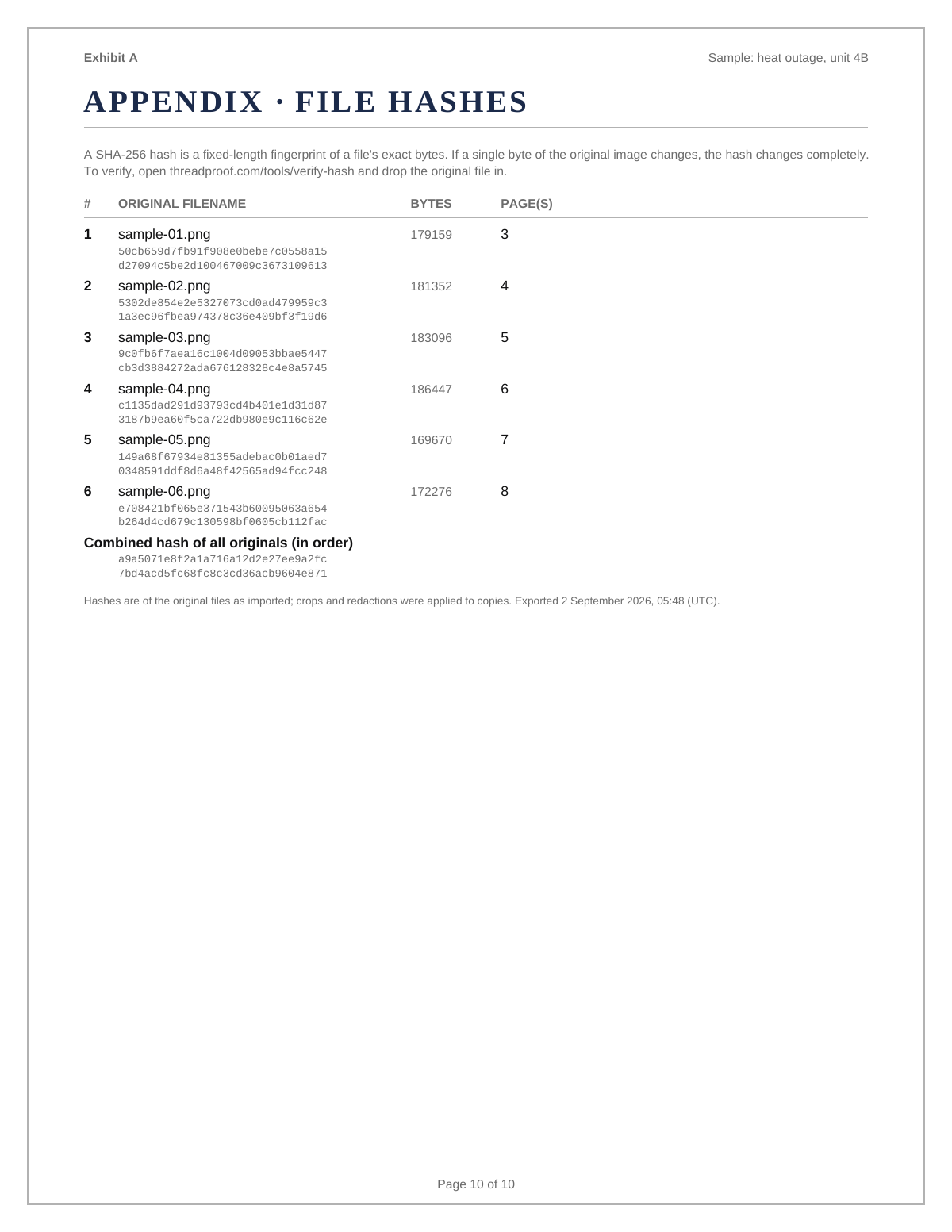
What a hash appendix actually proves
A hash turns a file into a fixed string of characters. Change one pixel and the string changes completely. Listing a hash for every source image means that later, if someone questions whether an image was altered after the exhibit was made, the original file can be hashed again and compared. It does not prove where the image came from or that the conversation happened, and no software can. It proves that the file you are holding is the file that was hashed.
One document, one date range
Resist the urge to combine three separate conversations into one exhibit. Give each thread its own document with its own cover page. Multiple small, clearly labelled exhibits are easier to reference than one large mixed file, and if only one is relevant later you can hand over that file alone.
- One conversation per exhibit.
- One clearly stated date range per exhibit.
- Sequential labels, Exhibit A, Exhibit B, and so on.
File names and delivery
Name the file so it makes sense in a list: matter name, exhibit letter, and date range, with no spaces problems. Send it as an attachment rather than a share link where possible, because links expire and recipients forward files, not links.
A folder of screenshots compared with a structured PDF
| Folder of screenshots | Structured PDF | |
|---|---|---|
| Order | Alphabetical by file name | Chronological and fixed |
| Missing pages | Invisible | Obvious from the page total |
| Context | None | Cover page states matter and range |
| Redaction | Ad hoc image editing | Logged with page and reason |
| Integrity check | None | Hash appendix per source image |
What to include
- Matter name and the parties on the cover page.
- The platform and device the messages came from.
- The date range covered and the total page count.
- A redaction log entry for every box drawn.
- A hash appendix listing every source file.
Common mistakes
- Mixing several conversations into one exhibit with no dividers.
- Numbering pages without a total, so a missing page is invisible.
- Redacting without recording what was covered or why.
- Reordering messages to build a narrative rather than following the clock.
- Discarding the source screenshots once the PDF exists.
What the PDF should contain
- Cover page: matter, parties, platform, date range, page count.
- Body: chronological screenshots at a readable size.
- Footer: page number and total on every page.
- Redaction log: page, box, reason.
- Hash appendix: file name and SHA-256 for each source image.
Build this exhibit on your phone
Add your screenshots, redact what should not be in the record, and export a numbered PDF. Nothing is uploaded.
Frequently asked questions
- What should a text message evidence PDF include?
- A cover page with the matter, parties, and date range; the screenshots in chronological order; continuous page numbers with a total; a redaction log; and a hash appendix with a fingerprint for each source image.
- Is a PDF better than printed screenshots?
- A PDF keeps order and page numbering fixed, and it can be filed, emailed, or printed. Loose printed screenshots lose their order the moment someone shuffles them.
- How many screenshots should go on one page?
- One or two, depending on how tall they are. Fitting four to a page saves paper and costs readability, which is the wrong trade for a document someone else has to read closely.
- What is a SHA-256 hash in plain language?
- It is a fingerprint of a file, written as a long string of characters. If the file changes at all, the fingerprint changes. Listing fingerprints lets someone check later that the images match the ones in the exhibit.
- Should the exhibit be labelled Exhibit A?
- Use whatever label the recipient expects. If nobody has told you, a simple sequential label such as Exhibit A on the cover page and in the footer is a safe, conventional choice.
- Can I add my own notes to the PDF?
- Keep notes off the screenshot pages. If explanation is needed, put it on the cover page or a separate summary page so the message pages stay as captured.
Summary
- Five parts do the work: cover page, ordered pages, numbering with a total, redaction log, hash appendix.
- One conversation and one date range per exhibit, labelled sequentially.
- Keep the source screenshots stored with the exported PDF.
Sources and further reading
Related guides
Cite this guide
ThreadProof team. “Text message evidence PDF: what belongs in the file.” ThreadProof, updated 2026-09-01. /guides/text-message-evidence-pdf
ThreadProof helps you format and organise documents. Nothing here is legal advice, and ThreadProof makes no representation about how any document will be treated by any court, agency, or other body. Rules differ by place and by matter. Questions: abe.mainlinesites@gmail.com.