How to print text messages for court
How to print text messages for court in 2026: screenshot the thread on your phone, keep dates visible, and build one numbered PDF exhibit. Nothing is uploaded.
Written by the ThreadProof team · Last updated · About the team
Changelog: Added the desktop-software comparison table and the 2026 iOS and Android screenshot steps.
Quick answer
Screenshot the whole conversation on your phone in order, keeping the date and time headers and the contact name visible in at least the first and last shot. Then combine the screenshots into one PDF with a cover page, continuous page numbers, and a page-count total, and print that single file.
To print text messages for court, you screenshot the conversation on the phone that holds it, keep every date and time header visible, and then put those screenshots into one PDF with a cover page and page numbers instead of printing forty loose images. A single ordered PDF is easier for a clerk to file, easier for a judge to follow, and far easier for you to explain than a stack of unnumbered pictures.
The phone itself is the source. You do not need special hardware, a subscription to a forensic tool, or a trip to a phone shop for most everyday matters such as small claims, landlord and tenant disputes, custody scheduling, or an unpaid invoice. You need the messages captured accurately, ordered correctly, and packaged in a way that a stranger can follow.
Steps
- Open the thread and scroll to the beginning. Open the conversation on the phone that received it and scroll back to the first message you plan to include. Starting mid-argument invites the question of what came before, so begin a little earlier than the part you care about.
- Turn on the date and time display. On iPhone, pull down slightly on the thread to reveal timestamps beside each bubble. On Android, tap a message to show its exact time, or enable timestamps in your messaging app settings. Dates matter more than any other detail in the printout.
- Screenshot in order with a small overlap. Take screenshots from the top of the thread to the bottom, letting each shot overlap the previous one by two or three lines. Overlap proves nothing was cut out between images and lets a reader stitch the sequence mentally without gaps.
- Capture the contact header. Include at least one screenshot showing the contact name or phone number at the top of the thread, and one showing the end of the conversation. Those two shots frame who the exchange is with and where it stops.
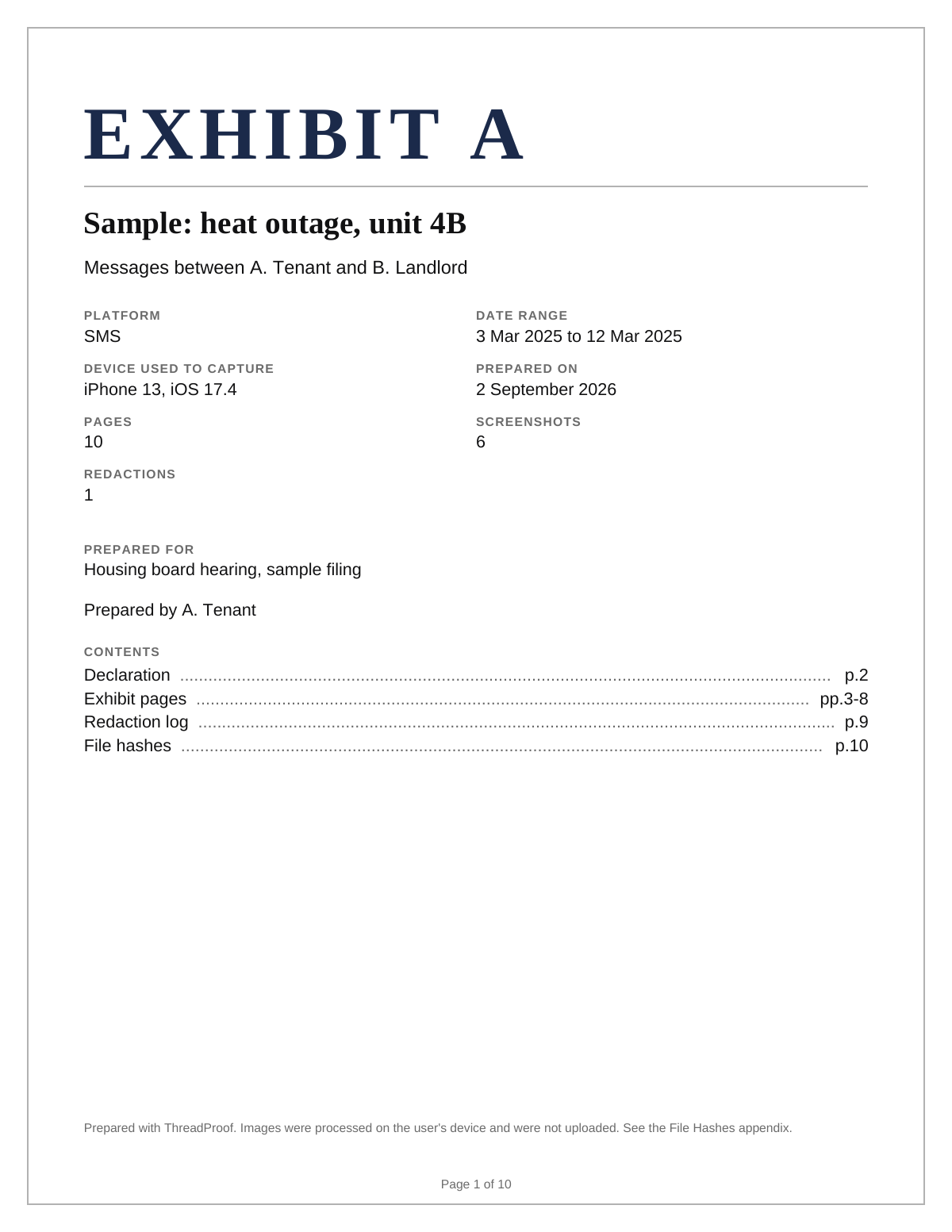
- Build one PDF instead of many images. Load the screenshots into ThreadProof in the order they were taken. It arranges them on paper-sized pages, adds a cover page with the matter name, and numbers the pages continuously from the cover to the last exhibit page.
- Redact, then export and print. Draw solid black boxes over anything that does not belong in the record, such as unrelated third parties or account numbers. Export the PDF, print it single sided, and keep the digital file for your own records.
Screenshots on your phone versus desktop extraction software
There are two common ways to get a conversation onto paper. The first is screenshots taken on the phone, which is what most people need. The second is desktop extraction software that reads a phone backup and produces a report with message metadata. Extraction software is useful when the volume is very large, when deleted messages are at issue, or when an expert will testify about the phone itself. For an ordinary dispute where you simply need to show what was said and when, screenshots organized into one PDF are quicker, cost less, and are easier to explain.
Why one PDF beats forty separate images
A folder of images has no order that anyone else can see. File names sort alphabetically, not chronologically, and once the pictures are printed nobody can tell whether a page is missing. A single PDF fixes that. Page numbers run continuously, a total page count on each page shows when something has been removed, and the cover page states what the document is before the reader sees a single message.
- Continuous page numbering means a missing page is obvious.
- One file attaches to one email, one filing, or one court portal upload.
- A cover page gives the matter name, the parties, the date range, and the page count.
- A hash appendix records a fingerprint of every source image so the file can be checked later.
Keep the original screenshots
Print the PDF, but never delete the source screenshots. Keep them in a dated folder on the phone and in one more place such as a computer or an external drive. If anyone questions the printout, the original images are the answer, and their file dates support the order you presented.
Phone screenshots versus desktop extraction software
| Phone screenshots into one PDF | Desktop extraction software | |
|---|---|---|
| Cost | Free to low, no hardware | Paid license, often per device |
| Time | Minutes | Hours, plus a full backup |
| Deleted messages | Not recovered | Sometimes recovered |
| Shows what a person saw | Yes, the actual screen | A rendered report, not the screen |
| Best for | Everyday disputes and clear threads | High volume or disputed deletion |
What to include
- The full date range of the conversation, not only the heated part.
- The contact name or number at the top of the thread.
- Visible timestamps on the first and last message of each day.
- Any attachments referenced in the text, captured as their own pages.
- A short cover page naming the matter and the parties.
Common mistakes
- Cropping out the date header to fit more messages on one screen, which removes the single most useful detail.
- Taking screenshots out of order and trusting file names to sort them, which they will not.
- Blurring names instead of covering them, because blur can sometimes be reversed.
- Printing images at different sizes so some messages are unreadable.
- Sending forty attachments in one email instead of a single organized file.
What the PDF should contain
- A cover page with the matter name, parties, date range, and total page count.
- Screenshots in chronological order, one or two per page, at a readable size.
- Continuous page numbers such as Page 4 of 22 on every page.
- A redaction log listing every box drawn and on which page.
- A hash appendix with a SHA-256 fingerprint of every source image.
Build this exhibit on your phone
Add your screenshots, redact what should not be in the record, and export a numbered PDF. Nothing is uploaded.
Frequently asked questions
- Can I just print screenshots from my phone?
- You can, and many people do. The weakness is order and completeness: loose prints have no page numbers, so nobody can tell whether pages are missing or shuffled. Putting the same screenshots into one numbered PDF takes a few extra minutes and removes that objection.
- Do text messages need to show the date and time?
- Dates and times are the detail people ask about first. Reveal timestamps before you screenshot, and include at least the first and last timestamp of each day. If your app hides them, tap an individual message to show its exact time and capture that.
- How do I print text messages for court from an iPhone?
- Open Messages, scroll to the start of the thread, drag left on the bubbles to reveal times, screenshot down the whole conversation with a small overlap, then combine the images into one PDF with a cover page and page numbers before printing.
- How do I print text messages for court from an Android phone?
- Open your messaging app, scroll to the start of the thread, enable timestamps in settings or tap a message to reveal the exact time, screenshot down the conversation, then build one numbered PDF from the images rather than printing them one by one.
- Should I include the whole conversation or only the important part?
- Include a wider range than you think you need. A short excerpt invites the question of what surrounded it. If the thread is very long, include continuous date ranges rather than isolated messages, and say in the cover page which range the exhibit covers.
- What if the other person deleted their copy?
- Your copy is still your copy. Capture what is on your device and keep the original screenshots. If deletion itself becomes the issue, that is the point where desktop extraction software or a professional examination of the device becomes worth the cost.
Summary
- Screenshot the whole thread in order on the phone that holds it, with dates visible.
- Combine the screenshots into one PDF with a cover page, continuous page numbers, and a page total.
- Cover sensitive details with solid black boxes, never blur, and keep the original screenshots.
Sources and further reading
Related guides
Cite this guide
ThreadProof team. “How to print text messages for court.” ThreadProof, updated 2026-09-01. /guides/how-to-print-text-messages-for-court
ThreadProof helps you format and organise documents. Nothing here is legal advice, and ThreadProof makes no representation about how any document will be treated by any court, agency, or other body. Rules differ by place and by matter. Questions: abe.mainlinesites@gmail.com.