How to print text messages from an iPhone for court
Print text messages from an iPhone for court: reveal timestamps in Messages, screenshot the thread in order, and export one numbered PDF exhibit from your phone.
Written by the ThreadProof team · Last updated · About the team
Changelog: Updated for the current iOS Messages timestamp gesture and full-page screenshot behaviour.
Quick answer
On an iPhone, open the thread in Messages, drag left on the bubbles to reveal the time beside each message, then screenshot from the top of the conversation to the bottom with a small overlap. Combine those screenshots into one PDF with a cover page and continuous page numbers, then print it.
To print text messages from an iPhone for court, you capture the thread with screenshots inside the Messages app, keep the date banners and the per-message times visible, and then assemble the images into a single numbered PDF. iOS does not offer a built-in export of a whole conversation, so screenshots are the reliable route, and they have an advantage: they show exactly what the screen showed.
The whole process happens on the phone. There is no cable, no backup, and no need to hand the device to anyone. ThreadProof runs in the phone browser and never uploads the images.
Steps
- Open Messages and find the thread. Open Messages and tap the conversation. Scroll up until you reach the first message you want in the exhibit, then go a little further back so the exhibit starts before the part in dispute.
- Reveal the timestamps. Drag the bubbles gently to the left. iOS slides the conversation over and shows the time next to each message. Date banners already appear between days. Take your screenshots while the times are visible.
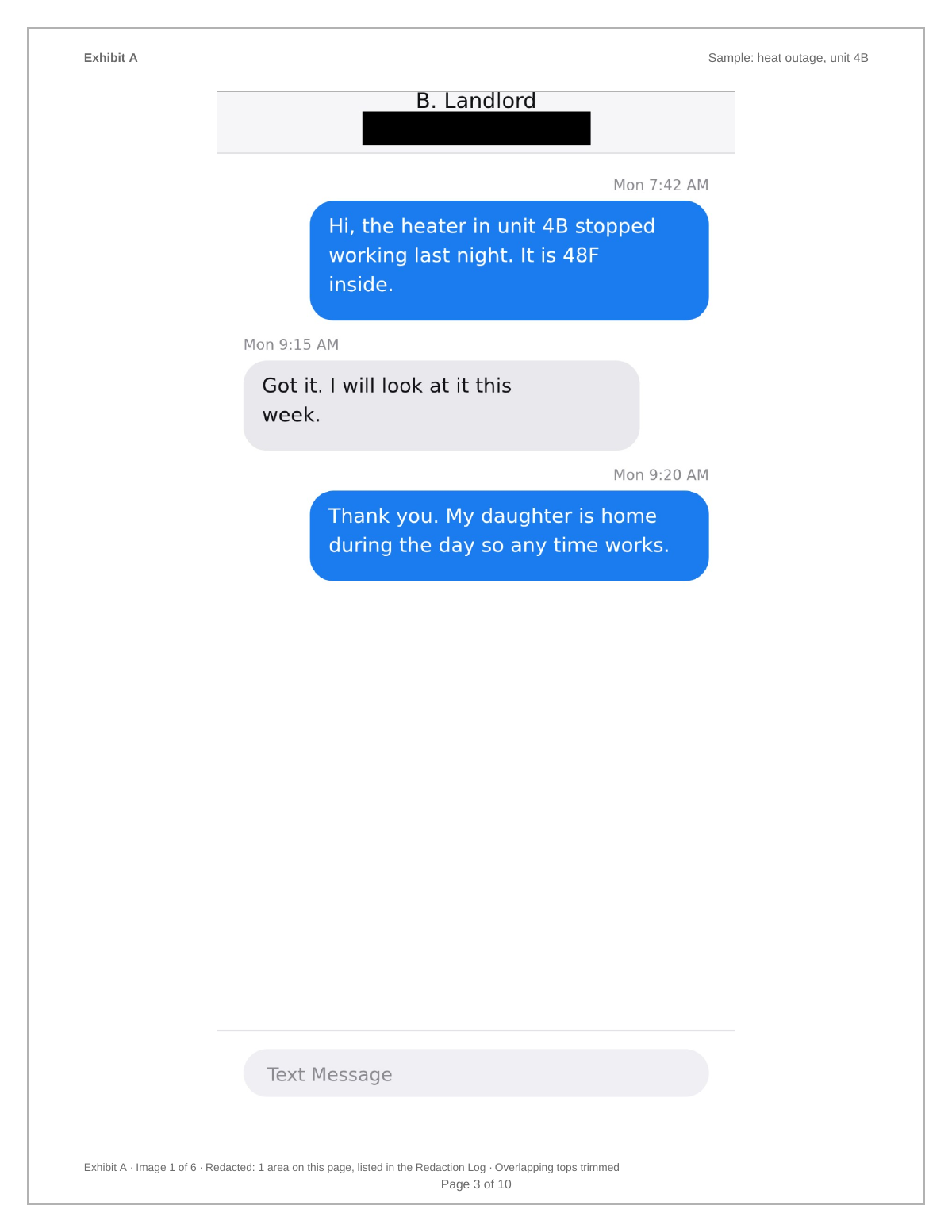
- Capture the contact header first. Take one screenshot at the very top of the thread showing the contact name or phone number, then continue down. That first image identifies who the conversation is with.
- Screenshot down the conversation. Press the side button and volume up together, scroll about eighty percent of a screen, and repeat. The small overlap between images proves nothing was skipped between screenshots.
- Check for green and blue bubbles. Blue bubbles are iMessage, green are SMS. Do not edit or recolour anything. If a thread mixes both, leave it as it is and note the mix on the cover page if it matters.
- Build the PDF and print. Open ThreadProof in Safari, add the screenshots from your Photos library, set the matter name, redact anything unrelated with solid boxes, and export a numbered PDF. Print from the exported file, not from Photos.
Why not use a Mac or iTunes backup
A Mac backup contains the message database, but reading it needs extraction software, and the output is a report rather than the screen the parties actually saw. For most disputes that extra layer creates more explaining, not less. Backups are worth it when deletion is contested or when the volume runs into thousands of messages.
Long threads and full-page captures
Safari can capture a full page, but Messages cannot. Do not try to compress a month of conversation into a handful of tall images by zooming out, because the text becomes too small to read once printed. Keep the phone at its normal text size and accept more pages. A readable twenty-page exhibit is better than an unreadable four-page one.
- Keep the standard system text size while capturing.
- Overlap each screenshot with the previous one by two or three lines.
- Capture attachments and photos as their own pages.
Keep the originals in Photos
Screenshots keep their creation date in the Photos library. Create an album for the matter, move the screenshots into it, and leave them there. If the printout is questioned, the album is your backup and the file dates support the order.
What to include
- The contact name or number at the top of the thread.
- Visible per-message times revealed by the drag gesture.
- The date banners between days.
- Photo and attachment messages as their own captures.
- The end of the conversation, so the exhibit has a clear stopping point.
Common mistakes
- Zooming out to fit more messages, which makes the printed text unreadable.
- Forgetting to reveal the times, leaving only the day banners.
- Screenshotting with a notification banner across the top of the screen.
- Sharing a single message with the share sheet instead of capturing the thread.
- Deleting the screenshots after printing.
What the PDF should contain
- A cover page naming the matter, the parties, and the date range.
- Ordered screenshots at a size that stays readable in print.
- Page numbers with a total on every page.
- A redaction log for every box drawn.
- A hash appendix listing a fingerprint for each source image.
Build this exhibit on your phone
Add your screenshots, redact what should not be in the record, and export a numbered PDF. Nothing is uploaded.
Frequently asked questions
- How do I show the time on iPhone text messages?
- Open the thread and drag the message bubbles to the left. The time for each message slides into view on the right. Hold the drag while you take the screenshot so the times are captured with the messages.
- Can I export an entire iMessage thread as a PDF?
- iOS has no built-in whole-thread export. Screenshots are the practical route, and they show the conversation exactly as it appeared. Combine them into one PDF so the result is a single ordered document rather than a folder of images.
- Do blue and green bubbles matter?
- Blue means the message went over iMessage and green means SMS. Neither changes what the message says. Leave the colours as they are and never edit the image; the point of a screenshot is that it is unedited.
- What about deleted iPhone messages?
- Screenshots capture what is on the device now. If messages were deleted and their absence matters, that is when a device backup and extraction software, or a professional examination, becomes worth the cost.
- Can I do this without a computer?
- Yes. ThreadProof runs in Safari on the iPhone itself. You add screenshots from Photos, arrange, redact, and export the PDF on the phone, then email or AirDrop the file.
- Should I print in colour?
- Colour is fine and keeps the bubble colours intact, but black and white is readable too. What matters more is that the text is large enough to read comfortably at arm's length.
Summary
- Reveal per-message times with the left drag gesture before capturing.
- Screenshot the thread top to bottom with overlap, including the contact header.
- Export one numbered PDF from the phone and keep the originals in a Photos album.
Sources and further reading
Related guides
Cite this guide
ThreadProof team. “How to print text messages from an iPhone for court.” ThreadProof, updated 2026-09-01. /guides/how-to-print-text-messages-from-iphone-for-court
ThreadProof helps you format and organise documents. Nothing here is legal advice, and ThreadProof makes no representation about how any document will be treated by any court, agency, or other body. Rules differ by place and by matter. Questions: abe.mainlinesites@gmail.com.